Early Access Feature
Long Horizon Agents
Long horizon agents will allow you to delegate complex, multi-step legal work with structured planning, parallel execution, and clear progress tracking—while staying in control at key steps.
Interested in testing this feature?
Contact your Customer Success Manager for early access.
Note: This update is rolling out in phases. Please reach out to your Customer Success Manager for earlier access.
Overview
Long Horizon Agents let you hand off complex, multi-step legal work to Harvey and move on to other priorities. Instead of executing tasks one by one and checking responses as they come, you describe the full objective and Harvey takes it from there — presenting a multi-step plan, finding relevant materials, checking in with you at key decision points, and delivering a finished work product.
Here's what that looks like in practice:
- Run multiple tasks in parallel. Start several work-streams at once and track each from the home screen.
- Skip the document-gathering step. Harvey searches iManage automatically, so you don't need to locate and upload materials yourself. Autonomous searching over vaults and other Document Management Systems (DMS) is coming soon.
- Review before work begins. For complex requests, ask Harvey for a structured plan you can approve, or edit or skip before it starts.
- Come back to finished work. Review outputs — including Word, Powerpoint, and Excel files — in the output panel when the task is complete.
Before You Start
This feature is in Early Access, admin opt-in is required. Long Horizon Agents is not enabled by default. A workspace admin must opt in via the Early Access waitlist before anyone can use it. Once enabled, it's available to all users in the workspace.
iManage search can also be requested with this EA. When Long Horizon Agents is enabled for a workspace that uses iManage, iManage search allows Harvey to find relevant documents automatically.
If your workspace doesn't use iManage, you can still use Long Horizon Agents by providing documents directly, but automatic context gathering won't be available. Broader DMS support is on the way.
How to Use
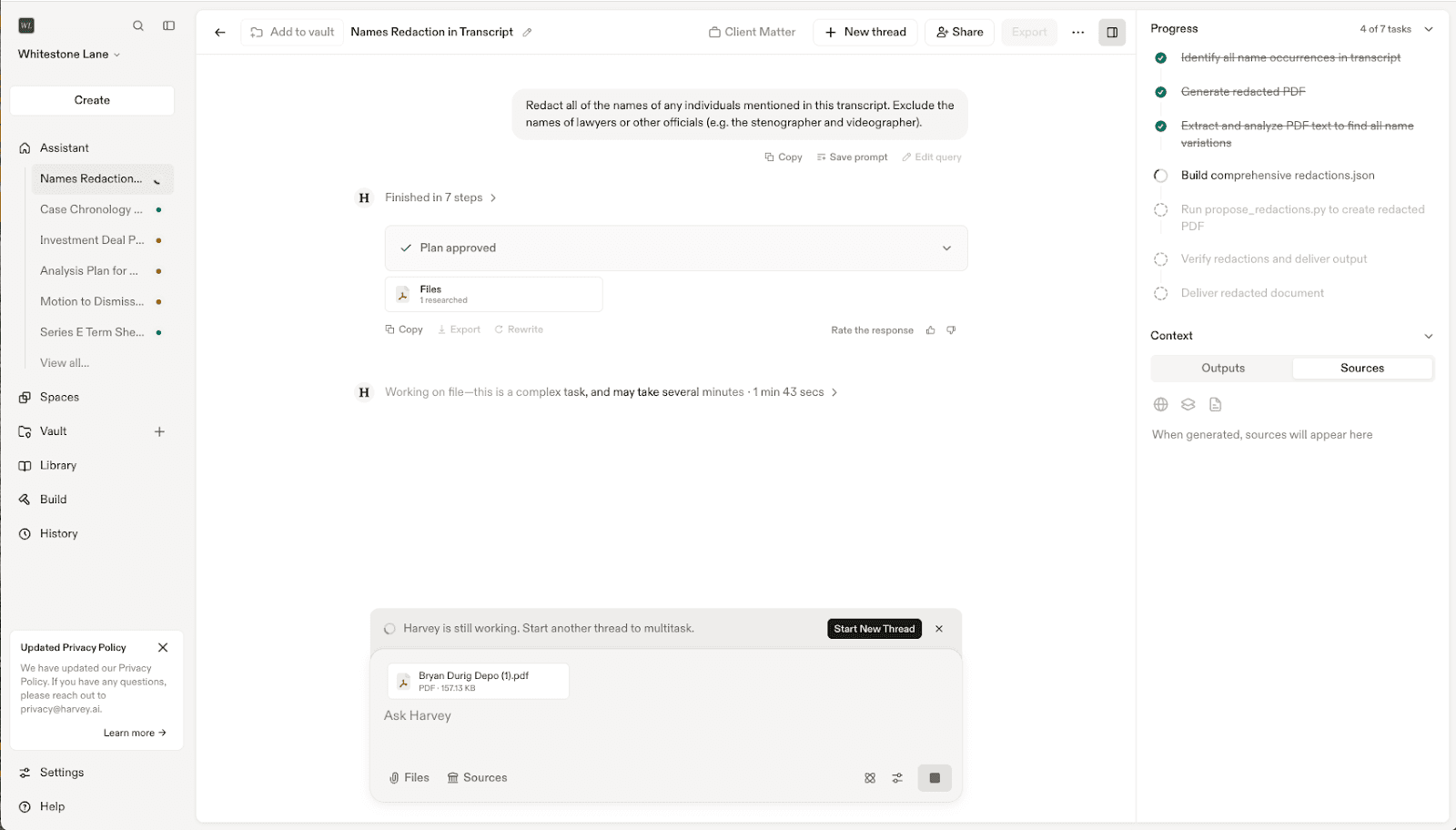
1. Start a Task
Long Horizon Agents activate automatically for complex requests. Simply draft a prompt in Assistant describing the work you want completed.
Example prompt
Instead of: Review these contracts.
Try: Review all contracts in this data room, extract key terms, and draft a summary memo aligned to our firm template.
Tip: The more specific your prompt, the better the plan and the final output.
- Include your full objective, any formatting requirements, and references to relevant templates or precedents.
- You can also use the "Improve prompt" feature to help write more detailed prompts.
2. Request a Plan (Optional)
For complex requests, Harvey generates a structured execution plan before starting any work. Harvey will execute on its own, but you have the option to review the plan first to verify scope, adjust the methodology, and confirm alignment with your usual processes before the agent runs.
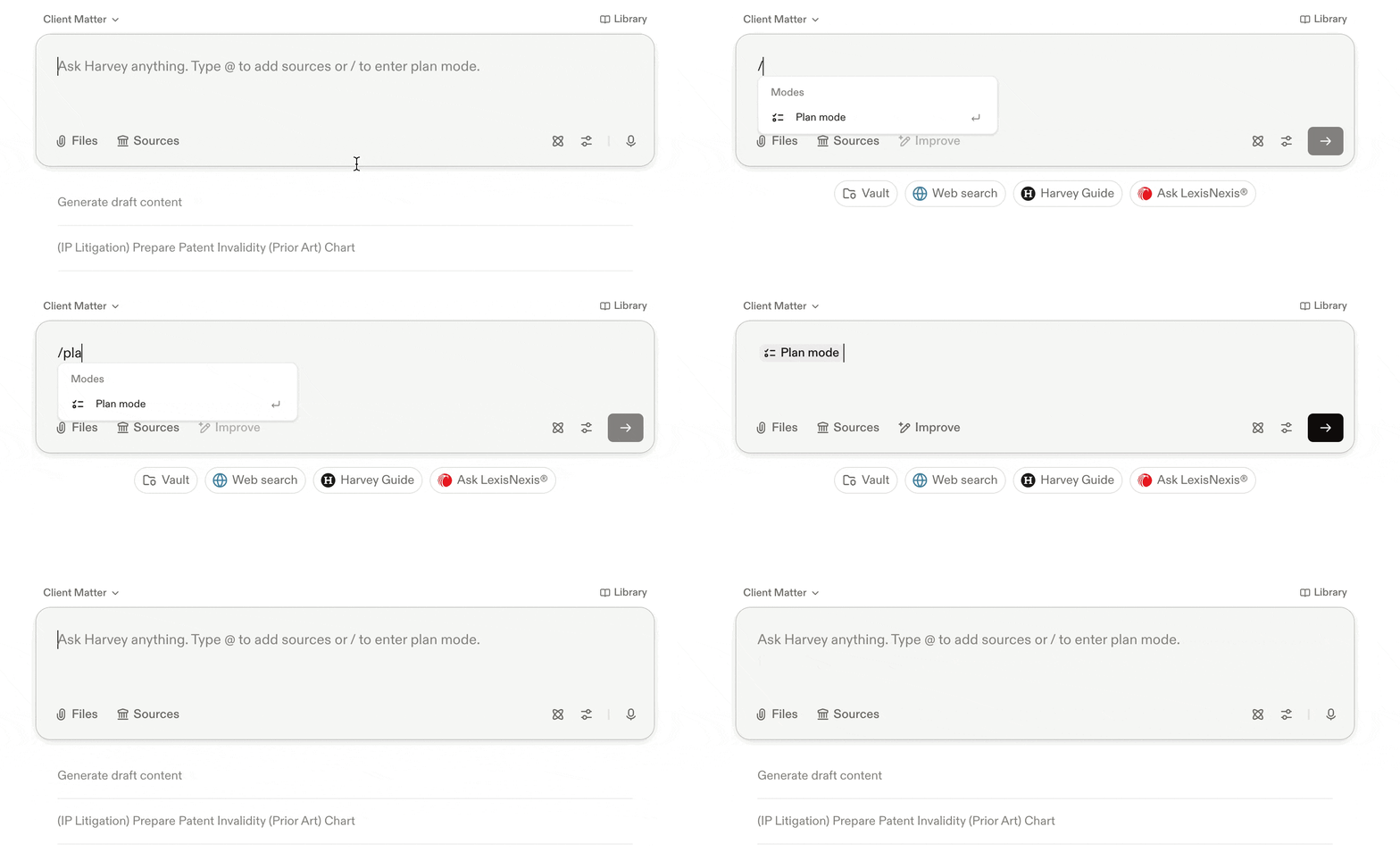
Before submitting your prompt, decide if you want to review Harvey’s plan by starting plan mode. To enable plan mode:
- Explicitly ask Harvey to share its plan
- Enter
/planin the prompt text box before or after drafting your prompt
3. Review the Plan (If One is Generated)
When a plan is ready, you have two options:
- Approve — Harvey proceeds exactly as written.
- Edit — describe your changes in plain language and Harvey updates the plan.
Tip: It's faster to adjust the plan than to fix outputs after the fact. Read it carefully before approving.
4. Answer Clarifying Questions (If Prompted)
If Harvey encounters something ambiguous mid-task, it pauses and asks a targeted clarifying question before continuing — rather than making an assumption that leads to outputs you'd need to redo.
- For example, if you ask Harvey to review all agreements in a data room but don't specify a format, it might ask "Which template should I use for the summary memo?" before moving on.
- Choose from the options provided, type your own answer, or skip to let Harvey use its best judgment.
5. Let it Run
You don't need to stay in the thread. Once the agent is running, you can move on to other work, start another agent, or close Harvey entirely. Check in from the home screen anytime — a status indicator shows whether each agent is running, done, or waiting for your input.
How do notifications work for long-running threads work?
A notification banner will appear above the prompt text box during long running tasks providing you the option to receive an email upon task completion.

- You must select the Notify me option to receive the email, these are not automatic.
- You may still close the page and return to it later, even if you do not request an email notification.
- These notifications are enabled by default, but admins can opt-out.
6. Monitor Progress in the Output Panel
Open the thread at any time to check in. The output panel shows:
- Task list — a live view of what the agent is working on and what's been completed.
- Outputs — files and drafts generated by the agent, ready to open, download, or save to your vault.
- Sources — the documents and materials the agent referenced.
7. Review and Use Your Outputs
When the task is complete:
- Open generated files from the output panel.
- Review the results and check them against your expectations.
- Continue refining in the same thread, or kick off the next workstream.
Additional Optional Steps
These steps aren't required to use Long Horizon Agents, but can improve the quality of Harvey's outputs.
1. Add Context
After starting a task, you can add additional files or sources for Harvey to reference. For example, upload a precedent memo, a firm template, or a term sheet that should inform how Harvey approaches the work.
Tip: Include instructions in your prompt on how each additional source should be used. Use @ to easily reference a file by name.
Notes & Limitations
- Not on by default. Requires admin opt-in through the Early Access program.
- iManage is the primary supported DMS. Broader DMS and vault support is coming.
- Email notifications for long running Assistant threads are opt-out at the workspace level, but are only sent when requested by individual users.
- No desktop or in-app notifications beyond email at this time.
- Copy prompts to reuse agent plan. To run a similar plan again, copy the plan text from a previous thread into a new prompt — the agent will follow the same steps.
- Plans aren't generated for every task. They're triggered by highly complex requests, or when you explicitly ask for one.
- Completion time may vary for complex, long-running tasks during Early Access.
Tips for Success
- Be specific: Include your full objective, formatting requirements, and any templates or precedents Harvey should follow.
- Review the plan: Use plan approval as a quality gate before the agent runs — it's the fastest place to catch scope or methodology issues.
- Run in parallel: Start multiple workstreams at once rather than waiting for one to finish before starting the next.
- Connect iManage first: Automatic context gathering removes a manual step and tends to improve output quality.
- Match the tool to the task: Use Long Horizon Agents for open-ended, complex work. Use Workflow Agents for structured, repeatable processes with fixed steps.
FAQs
Q: Do I need to stay in the thread while the agent runs?
No. Start the task and move on. You can check progress from the home screen or get an email when it's done.
Q: How can I trust the outputs?
Harvey builds validation into every agent run: you approve the plan before work starts, the agent pauses to ask if it hits something ambiguous, and the output panel gives you a full view of what was done and what sources were used.
Q: Can the agent access my document management system?
Yes — agents can search iManage for relevant context if you select iManage search as a source. Support for other DMS systems and vaults is expanding.
Q: How does Harvey prevent agents from accessing matters they shouldn't?
Agents can only access and act on what you're authorized to use.
Q: Can I reuse a plan for a future task?
Not directly — plans aren't saved as reusable objects yet. To repeat one, copy the plan text from a previous thread into a new prompt and the agent will follow the same steps.
Q: When should I use Long Horizon Agents vs. Workflow Agents?
Long Horizon Agents are for open-ended, complex work that needs dynamic planning — like full deal diligence. Workflow Agents are for structured, repeatable processes with fixed steps — like a standard contract review checklist.
Q: Does this work in Shared Spaces?
Yes. Queries submitted from Shared Spaces can use Long Horizon Agents.
Q: Do I need a DMS connected for plans to work?
No. Harvey can generate a plan for any type of query — vaults, a DMS, knowledge sources, or open-ended questions. A connected DMS improves context gathering but isn't required.
Q: What notification options are available?
Email notifications are available now. Desktop and in-app notifications aren't supported yet but are being considered.
Q: Are there any limits on LHA outputs or context window?
Long Horizon Agents are capable of producing lengthier and more complex outputs than ever before. Note there is not a defined maximum output length as this depends heavily on the nature of the task. Long Horizon Agents may still encounter context window limitations depending on the complexity of your task, particularly if your task requires comprehensively reviewing or evaluating very large or lengthy document sets.